Interior scans do not show the site
A standard Matterport tour captures rooms well but says little about how the rooms relate to each other outdoors. A visitor cannot see where the villa sits against the beach, how far the spa is from the lobby or which berth is near the clubhouse. Ground photos help only partly. Without an exterior view, large sites are hard to explain, and the indoor tour has no natural starting point.
Drone capture
360INT flies a DJI Matrice 4E over the site and records the 3D data needed to model buildings, grounds and surroundings.
Photorealistic exterior
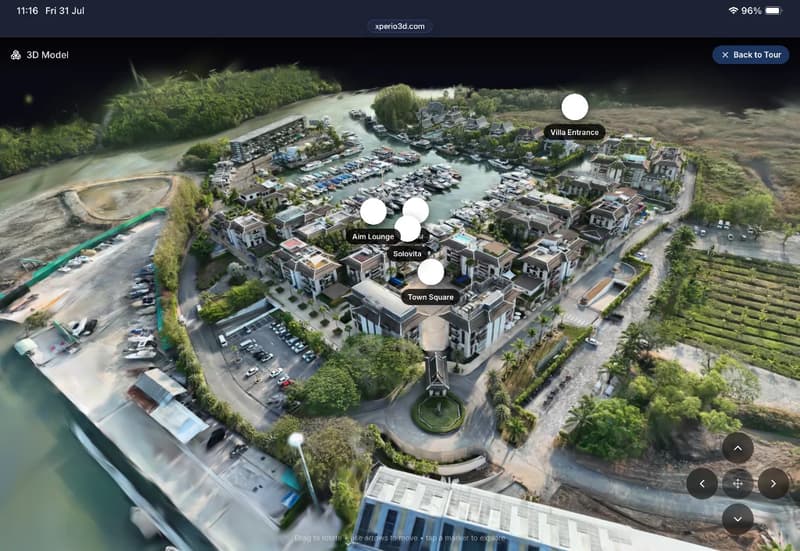
The data becomes a photorealistic 3D exterior view, built with Gaussian splatting, that visitors can rotate, zoom and explore.
A third view
The exterior sits next to the Matterport walkthrough and dollhouse, so visitors move between outside, inside and overview.
Points that lead indoors
Entrances, buildings, villas or berths on the exterior open the matching Matterport interior with one click.
Main site overview
Use the exterior as the entry point to the whole tour, so visitors choose where to go from a view of the site.
Explore Royal Phuket Marina
The demo shows a marina from above, with points that lead into interior spaces. Rotate the exterior, then step inside.
What 360INT takes care of
Xperio3D is developed by 360INT. We capture the space, set the feature up, prepare the content and keep it current, so your team receives a finished experience instead of another tool to learn.
Site planning
We study the site, check where flights are possible and agree the area to be covered.
Drone flights
We fly the capture and gather the interior scans that the exterior will link to.
Model and links
We create the exterior view and place the points that open each interior.
Updates after changes
When buildings, berths or grounds change, we re-capture the affected area and refresh the view.
- —Flight permissions are checked for each site before any capture is planned.
- —Weather and site conditions affect scheduling, so dates may move.
- —Very large sites are scoped by area in the quotation.
- —Points only lead indoors where an interior scan exists.
From scope to a live exterior 3d maps
- 1Scope the site
You share the location and goals. We check permissions and estimate the area.
- 2Fly and scan
We capture the exterior by drone and the interiors with Matterport.
- 3Build and link
We model the exterior and connect each point to its interior.
- 4Publish and refresh
The exterior goes live in your tour. We re-capture when the site changes.
Industries that use this feature
Exterior 3D Maps: Common Questions
Add exterior 3d maps to your tour
Tell us about your space and the systems you use. We confirm what fits, how it connects and what it costs before anything is booked.
Begin a Project