A walk-through with no way to buy
A standard Matterport tour lets people look at products, but nothing is for sale. A 360 photo tour is the same. The visitor sees a sofa, then searches your website for it, if they bother. Product tags with prices, variants and a cart remove that step. The product is bought from the spot where it was seen, and you choose whether the order is placed in the tour or in your own shop.
Product tags
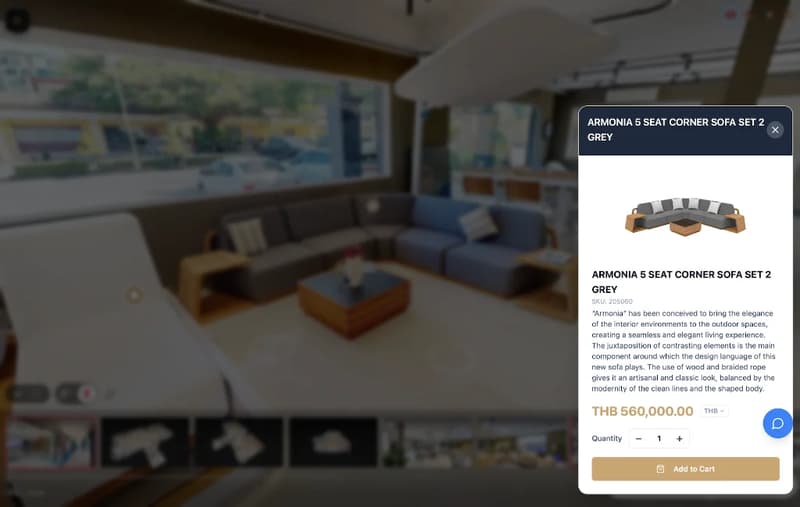
Tag any item in the space. The tag opens a card with images, price and variants, so the visitor reads about the product where it stands.
Stock status
Each product shows in stock, pre-order or on request, so visitors know what to expect before they add it to the cart.
Two checkout modes
Check out inside the tour, or hand the cart to your own shop to finish there. You pick one per project.
Shopify live sync
A Shopify catalogue stays in step with the tour through the Storefront API. Products, prices and images update from your shop.
CSV import
WooCommerce and other shops load through CSV import. Live WooCommerce API sync is not available.
Card and local payment
In-tour checkout takes card payment through Stripe, with PromptPay QR or bank transfer as options. PayPal is not available.
See two working shops
HiSo Living Bangkok shows a furniture showroom with tagged pieces and a cart. Nafplio shows a gallery with a shop. Walk through both and add something to the cart.
What 360INT takes care of
Xperio3D is developed by 360INT. We capture the space, set the feature up, prepare the content and keep it current, so your team receives a finished experience instead of another tool to learn.
Scan the floor
We scan the showroom, gallery or store with Matterport Pro3, so every product has a place in the tour.
Catalogue
We structure your catalogue, write product text where needed and tag each item in its position.
Shop and payments
We link Shopify, load your CSV files and set up Stripe, PromptPay or bank transfer for in-tour checkout.
Test orders, keep stock current
We test carts and payments, then refresh products and prices when your range changes.
- —Orders taken inside the tour are recorded in Xperio3D and are not written back to your shop.
- —If stock and orders must stay in one system, use the hand-over mode and finish checkout in your own shop.
- —WooCommerce and other shops need CSV re-imports, because live sync exists for Shopify only.
- —Card payments need a Stripe account in your name.
From scope to a live 3d shopping
- 1Scope
We agree the product range, checkout mode and payment methods.
- 2Capture and tag
We scan the space, then place product tags from your catalogue.
- 3Link and test orders
We link the shop or CSV data, then run test orders through each payment path.
- 4Go live
The shop opens on your site, and we update the catalogue as it changes.
Industries that use this feature
3D Shopping: Common Questions
Add 3d shopping to your tour
Tell us about your space and the systems you use. We confirm what fits, how it connects and what it costs before anything is booked.
Begin a Project